Pragma Fortress SSH Client
Pragma Fortress SSH Client Suite contains industrial grade Windows SSH/SFTP/SCP graphical & command line clients for encrypting and connecting to highly secure environments like Cisco networking devices and enterprise servers running SSH. The clients support 2-factor authentication and are RFC 6187 compliant with full smart card support needed for intrusion protection and to combat cybersecurity threats posed for remote access.
Included Tools
2-in-1 graphical SSH client and telnet client
- Algorithm Specs
-
Key Exchange: curve25519-sha256, ecdh-sha2-nistp521, ecdh-sha2-nistp384, ecdh-sha2-nistp256, diffie-hellman-group-exchange-sha256, diffie-hellman-group14-sha1, diffie-hellman-group14-sha256, diffie-hellman-group15-sha512, diffie-hellman-group16-sha512, diffie-hellman-group17-sha512, diffie-hellman-group18-sha512
Ciphers: 3des, blowfish, 3des-cbc, blowfish-cbc, aes128-cbc, aes192-cbc, aes256-cbc, aes128-ctr, aes192-ctr, aes256-ctr
MACs: hmac-sha2-256, hmac-sha2-512, hmac-sha1, hmac-sha1-96, hmac-md5, hmac-md5-96
- RFC 6187 2 factor authentication support
- X.509 public key certificates use a signature by a trusted certification authority to bind a given public key to a given digital identity
- FIPS 140-3 compliant
-
Is FIPS 104-3 compliant, using Microsoft crypto library, which has achieved FIPS 140-3.
Pragma has its own crypto library which is based on Microsoft Cryptographic Primitives Library
which attained FIPS 140-3 Certification (NIST certificate #5410).
Microsoft NIST #5410 certificate
View the policy document for Cert 5410 - Supports port forwarding
- Enables secure transmission by any TCP/IP application by passing the data over a secure SSH session, with only minimal changes to the application required
- Session logging
- Optionally logs session output to a text file (only includes printable ASCII characters).
- Handles multiple server configurations
- There's no need to reconfigure the client for each server used
- Authentication
- Authenticates users with certificate, password, and Windows GSS-API Kerberos and NTLM Active Directory authentication, allowing single step sign-on for seamless secure access to Windows networks
- Customizable terminal window and fonts
- To make your software environment most comfortable, you can dynamically resize the terminal window by changing the size properties of the console window. And you can choose any fonts supported by the Windows console
- SSL support for telnet sessions
- Reliable and Proven
- Years of engineering design and feedback from a multitude of users have perfected Pragma SSH Client. It has proven to be the most reliable SSH and telnet client software on the market - just install it, configure it to suit your preferences, and you do not have to think about it again.
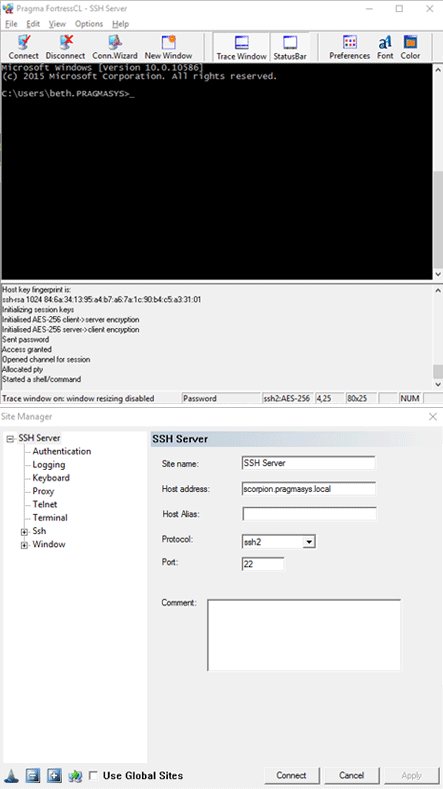
GUI secure file transfer (SFTP) client
- Easy user interface
- Start a transfer in multiple ways, including drag and drop
- Handles multiple server configurations
- There's no need to reconfigure the client for each server used
- Authentication
- Authenticates users with certificate, password, and Windows GSS-API Kerberos and NTLM Active Directory authentication, allowing single step sign-on for seamless secure access to Windows networks
- Algorithm Specs
-
Key Exchange: curve25519-sha256, ecdh-sha2-nistp521, ecdh-sha2-nistp384, ecdh-sha2-nistp256, diffie-hellman-group-exchange-sha256, diffie-hellman-group14-sha1, diffie-hellman-group14-sha256, diffie-hellman-group15-sha512, diffie-hellman-group16-sha512, diffie-hellman-group17-sha512, diffie-hellman-group18-sha512
Ciphers: 3des, blowfish, 3des-cbc, blowfish-cbc, aes128-cbc, aes192-cbc, aes256-cbc, aes128-ctr, aes192-ctr, aes256-ctr
MACs: hmac-sha2-256, hmac-sha2-512, hmac-sha1, hmac-sha1-96, hmac-md5, hmac-md5-96
- Highly secure
- Supports multiple advanced encryption algorithms for maximum security, including AES128, 192, 256, Blowfish, 3DES, Arcfour, and CAST128.
- FIPS 140-3 compliant
-
Is FIPS 104-3 compliant, using Microsoft crypto library, which has achieved FIPS 140-3.
Pragma has its own crypto library which is based on Microsoft Cryptographic Primitives Library
which attained FIPS 140-3 Certification (NIST certificate #5410).
Microsoft NIST #5410 certificate
View the policy document for Cert 5410 - Broad Windows OS support
- Runs in Windows Server 2025/2022/2019/2016/2012R2/2008R2 and Windows 11/10/8/7.
- Unparalleled Performance
- Pragma SSH Client uses advanced algorithms to deliver unmatched transfer speeds. When tested with Pragma SSH Server, our SSH client performed up to 45-60 times faster than a leading competitor's product.
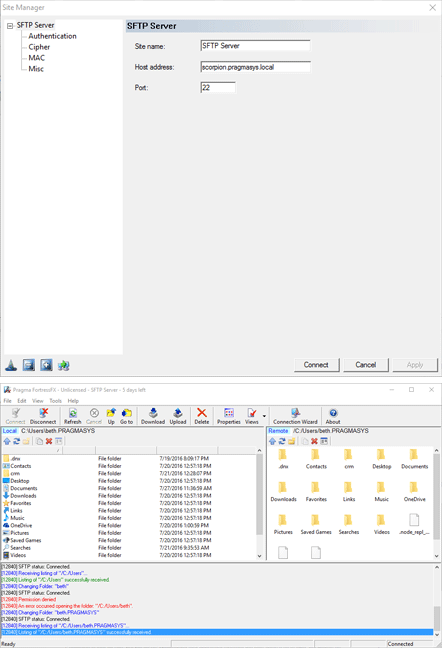
Console SSH client
- Algorithm Specs
-
Key Exchange: curve25519-sha256, ecdh-sha2-nistp521, ecdh-sha2-nistp384, ecdh-sha2-nistp256, diffie-hellman-group-exchange-sha256, diffie-hellman-group14-sha1, diffie-hellman-group14-sha256, diffie-hellman-group15-sha512, diffie-hellman-group16-sha512, diffie-hellman-group17-sha512, diffie-hellman-group18-sha512
Ciphers: 3des, blowfish, 3des-cbc, blowfish-cbc, aes128-cbc, aes192-cbc, aes256-cbc, aes128-ctr, aes192-ctr, aes256-ctr
MACs: hmac-sha2-256, hmac-sha2-512, hmac-sha1, hmac-sha1-96, hmac-md5, hmac-md5-96
- Supports port forwarding
- Pragma's secure shell clients enables secure transmission by any TCP/IP application by passing the data over a secure SSH session, with only minimal changes to the application required
- Broad Windows OS support
- Runs in Windows Server 2025/2022/2019/2016/2012R2/2008R2 and Windows 11/10/8/7.
- Scripting
- Use easy-to-write script files to automate logon and session operation.
- Gateway capability
- Can be used inside a telnet or SSH session to connect to another telnet or SSH server
- Authentication
- Authenticates users with certificate, password, and Windows GSS-API Kerberos and NTLM Active Directory authentication, allowing single step sign-on for seamless secure access to Windows networks
- FIPS 140-3 compliant
-
Is FIPS 104-3 compliant, using Microsoft crypto library, which has achieved FIPS 140-3.
Pragma has its own crypto library which is based on Microsoft Cryptographic Primitives Library
which attained FIPS 140-3 Certification (NIST certificate #5410).
Microsoft NIST #5410 certificate
View the policy document for Cert 5410
Console SFTP and SCP clients
- Algorithm Specs
-
Key Exchange: curve25519-sha256, ecdh-sha2-nistp521, ecdh-sha2-nistp384, ecdh-sha2-nistp256, diffie-hellman-group-exchange-sha256, diffie-hellman-group14-sha1, diffie-hellman-group14-sha256, diffie-hellman-group15-sha512, diffie-hellman-group16-sha512, diffie-hellman-group17-sha512, diffie-hellman-group18-sha512
Ciphers: 3des, blowfish, 3des-cbc, blowfish-cbc, aes128-cbc, aes192-cbc, aes256-cbc, aes128-ctr, aes192-ctr, aes256-ctr
MACs: hmac-sha2-256, hmac-sha2-512, hmac-sha1, hmac-sha1-96, hmac-md5, hmac-md5-96
- Broad Windows OS support
- Runs in Windows Server 2025/2022/2019/2016/2012R2/2008R2 and Windows 11/10/8/7 and supports 32-bit and 64-bit processors
- Scripting
- Use easy-to-write script files to automate logon and session operation.
- Authentication
- Authenticates users with certificate, password, and Windows GSS-API Kerberos and NTLM Active Directory authentication, allowing single step sign-on for seamless secure access to Windows networks
Essential Command Line Tools
- Delete Directory Tree
- Find File
- Kill Active Process
- Get Operating System Information
- Password Changer Program
- Console Registry Editor
- Show Active Processes
- FTP Client
- Get Current User Name
- Fast File Text Viewer
- Which Executable
- Internet User Name Directory Service
- Change Computer Name
- Change Current Console Settings
- Shutdown Program
- Keyboard Tester
- Process Sleep
- Get Group Information
- Get User Information
- RunAs
Our Certifications
Pragma crypto libraries obtained US NIST FIPs certification for Windows 10, Windows Server 2016 and Windows server 2012R2.
Pragma products are fully compatible and tested for use in in Windows Server 2019 and are used in thousands of customer sites worldwide.
 |
 |
 |
 |
 |
 |
 |
 |
Pragma Clients come out the fastest!!
| Pragma FortressFX (5.0.10.643) | Pragma CLI SFTP (5.0.10.643) | WinSCP (5.7.7) | Competitor T (6.4.13.36) | Competitor V (8.0) | ||||||
| FileSize | upload | download | upload | download | upload | download | upload | download | upload | download |
| Individual File Selection | ||||||||||
| 12KB | <1 sec | <1 sec | <1 sec | <1 sec | <1 sec | <1 sec | 00:01 | 00:01 | <1 sec | <1 sec |
| 779MB | 00:47 | 00:52 | 00:40 | 01:00 | 01:40 | 01:08 | 01:52 | 01:40 | 01:58 | 01:00 |
| 2.27GB | 02:00 | 02:02 | 01:47 | 02:31 | 04:24 | 03:27 | 05:09 | 05:00 | 05:54 | 03:02 |
| 3.41GB | 03:32 | 03:33 | 03:09 | 03:09 | 06:07 | 05:15 | 07:58 | 07:12 | 08:35 | 04:42 |
| Batch File Transfers | ||||||||||
| 12KB | <1 sec | <1 sec | <1 sec | <1 sec | <1 sec | <1 sec | <1 sec | 0:01 | <1 sec | <1 sec |
| 779MB | 01:00 | 00:54 | 00:40 | 00:36 | 01:14 | 02:46 | 02:05 | 01:37 | 01:07 | 01:29 |
| 2.27GB | 02:00 | 02:07 | 01:58 | 02:11 | 04:03 | 06:35 | 07:51 | 04:54 | 03:27 | 03:05 |
| 3.41GB | 03:25 | 03:10 | 03:09 | 03:12 | 05:20 | 11:54 | 05:16 | 07:15 | 05:15 | 04:46 |
Actual Test Data (May 2016)