|
The Logon page is used to configure what happens after the user is authenticated and before the logon script is run.
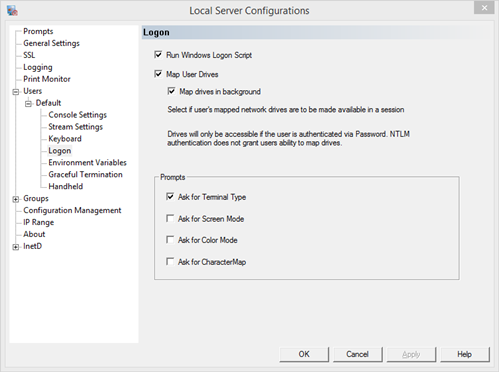
Run Windows Logon Script - whether to run any assigned script under the Windows user profile
Run the logon script defined for the user under the Windows User Management Profile configuration. This is on by default, but to avoid conflicts, this setting should be turned off if the user is to run a logon script defined for the telnet session.
Map User Drives - make drives mapped for the user profile available within the session
Turn this option on to have drives mapped outside the telnet session be available inside the telnet session.
Map drives in background - map drives in separate thread. This allows the connection to continue while drives are mapped, since mapping drives can sometimes take a long time. If a drive is needed immediately, then this option cannot be used. If the mapped drives are needed at a later time in the session, use this option to speed up connection time.
Prompts
Ask for Terminal Type - prompt the user for predefined terminal types
Supported terminal types include: ANSI, VT100 through VT420, WYSE 50, WYSE 60, IBM 3151 and WindowsTerm. When using WindowsTerm on the client, the user will not be prompted for terminal type, even when this box is checked. The client will normally negotiate a valid terminal type, but if the client for some reason does not pass a valid terminal type, this allows the server to run in a known terminal type. Note that if the client and server are running in different modes, there could be display issues. Compare the TERM and CRTERM variables to check for comparable terminal types.
Ask for Screen Mode - prompt the user for screen mode
The user will be prompted for the four types of screen modes: Advanced Console, Full Console, Full Stream and Stream. These modes are explained more on the User General Settings page. Enter the character response to set the screen mode. This is helpful if users need to perform different kind of tasks in their sessions.
Ask for Color Mode - prompt user for color use
To prompt the user whether the current session will use color or run in monochrome with only gray scale support.
Ask for Character Map - prompt user for a character map defined in the charmap.ini file
Display the prompt of all headers defined in the charmap.ini file. Custom headers will displayed at this prompt as well as any predefined headers shipped with the server.
|