|
Use the Graceful Termination page to configure how the server can close applications that might be left when a session is closed. The executables listed are terminated first, and then Monitor Child Processes kills any remaining processes from the session. See User General Settings for more information about Monitor Child Processes.
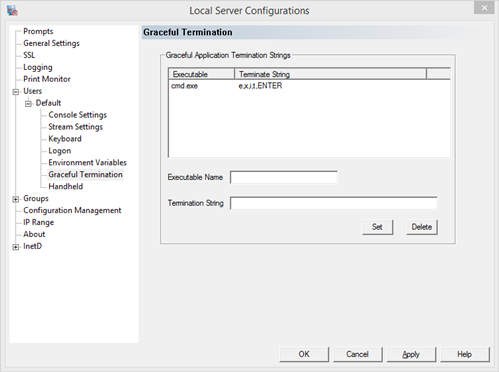
To add a new application, enter the executable name and the key sequence that will close the application, then click the Set button. The sequence must work no matter what state the application is in. For example, when editing with vi.exe, the application will always exit with ESC-!-q.
To edit an existing entry, highlight the entry and modify the value in the edit boxes, then click Set.
To delete an existing entry, highlight the entry and click the Delete button.
Executable Name - The name of the application executable. Process name only, not full path to the executable.
Termination String - The termination key sequence to execute. Termination strings are defined as key sequences, separated with commas (,). Keys that are pressed simultaneously are defined with a dash (-).
Special characters are defined as follows, and are case sensitive:
ESC
ENTER
ALT
CTRL
SHIFT
F1
F2
F3
F4
F5
F6
F7
F8
F9
F10
F11
F12
SLEEPX ( X is replaced with a number, also SLEEP must be upper case)
Here are some examples:
To send sequence CONTROL ALT x, pressed simultaneously:
CTRL-ALT-x
To send the word: hello, pressed individually:
h,e,l,l,o,ENTER
To send sequence CONTROL ALT Function Key 4, pressed simultaneously:
CTRL-ALT-F4
To send the above, sleep for 5 seconds, then send "exit":
CTRL-ALT-F4,SLEEP5,e,x,i,t,ENTER
|