|
The Print Monitoring page is used to configure printer ports for print redirection to the remote client. The port must be a physical port not in use by another program. Pragma TelnetServer will replace the print driver for that port to a driver that is telnet aware and can redirect to the client based on user and domain.
Due to the fact that the printer driver is outside the telnet session, the print jobs cannot be distinguished by IP address, so users must log on with different user names to use our print monitoring feature.
See Printing Support for information on how to successfully set up remote printing.
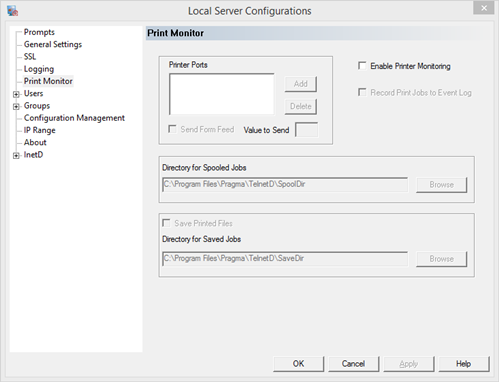
Enable Print Monitoring - turn printing support on and off
Printer Settings
Printer Ports - the serial or parallel port to use for printing. This must be a physical port not in use by another application.
Send Form Feed - send a form feed after each print job
Value to Send - the value the printer uses for form feed, usually 12
Directory for Spooled Jobs - spool directory
Print jobs are spooled through this directory. The printer driver creates the file under username and time. Each server process monitors this directory for the a job under the logged in users name. It will then open that file and send it to the client. Users must have read/write access to the directory and the directory cannot be in use by any other process. The default directory is created during the installation. If another directory is desired, it must be created by the user.
Save Printed Files - save jobs after they are printed
The server can save each job after it is printed. This allows administrators to view anything printed to the client or the opportunity to reprint jobs in case of failure by moving the saved file to the spool directory.
Directory for Saved Jobs - directory for saved jobs
The default directory is created during the installation. If another directory is desired, it must be created by the user. Users must have write access to this directory.
|