|
Use the authentication page to configure what type of authentication should be used for the connection.
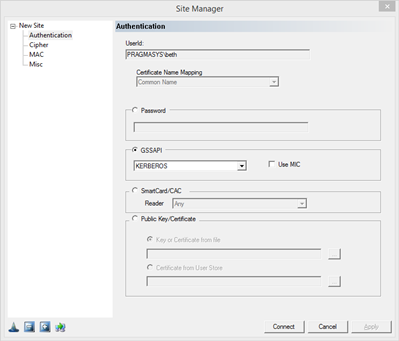
Password: Select the radio button marked Password to use Password authentication. Enter the password in the edit box. Fill the UserId edit box with the username of connecting user. The username/password pair will be used for connection.
Generic Security Service Application Programming Interface (GSSAPI): GSSAPI is an industry wide standard to access various security authentication mechanisms in an environment without knowing how it is implemented in an operating system. GSSAPI is the accepted standard in SSH world to use Kerberos or NTLM for user authentication. This allows users to login to a system securely without having to provide a password. All SSH related standard documents, including GSSAPI use in SSH, can be found at the web site: http://www.ietf.org/html.charters/secsh-charter.html.
Kerberos: Select the radio button marked GSSAPI and then from the drop down menu, select Kerberos to use GSSAPI Kerberos authentication. It is a highly secured authentication method that uses secret-key cryptography. During Kerberos authentication, client proves its identity to the server and vice versa. A ssh user’s identity is authenticated cryptographically by a Kerberos server without the user having to provide a password.
NTLM: Select the radio button marked GSSAPI and then from the drop down menu, select NTLM to use GSSAPI NTLM authentication. NTLM is an authentication protocol used in various Microsoft network protocol implementations. NTLM is used throughout Microsoft's systems as an integrated single sign-on mechanism. Interactive user information will be set as the remote user context, using Windows certificate based authentication, will connect you. You will not be prompted for username or password. NTLM authentication cannot be used to logon a user other than the client interactive user.
Either: Select the radio button marked GSSAPI and then from the drop down menu, select the Either option to use either Kerberos or NTLM authentication. If SSH server's GSSAPI authentication method is not known, leaving this option at Either will allow Pragma Fortress CL/FX client to determine server supported authentication method and proceed accordingly.
Use MIC: This is a GSSAPI specific setting. MIC is Message Integrity Check. By default, this option is checked. Most SSH servers that support GSSAPI use the MIC setting as part of the GSSAPI Kerberos/NTLM authentication.
Smart Card/CAC: Select this option for the client to prompt any attached card reader for identification.
Public Key/Certificate: Select the radio button marked Certificate to use Certificate (Private/Public Key based) authentication. Certificate authentication uses public keys to gain access to the server. The public key used must have been supplied to the server prior to an authentication request. The public/private key pair should be generated using the FortressCL Key Generator. The public key resides in the client machine while the private is stored in a secret location in the SSH server. For more information on Certificate authentication and support, click here.
Key or Certificate from file: Select the private key from the key pair to be used for authentication.
Certificate from User Store: Select the certificate stored in a central user store.
|