|
To generate a key for certificate authentication, use the Generate Key dialog under Options -> Generate Key.
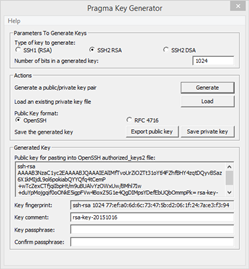
Parameters To Generate Keys
Type of key to generate: choose the type of key to generate
SSH1 (RSA)
SSH2 RSA
SSH2 DSA
Number of bits in a generated key: set the key size in bits
Actions
Generate - click to start key generation. Move the mouse as prompted to generate randomness to the key.
Load - use the load key to import keys from other clients.
Public Key format:
OpenSSH - public key format compatible with Pragma Fortress SSH Server and OpenSSH servers
RFC 4716 - public key format that follows the RFC 4716
Save - save both the public key and private key using the same name
|