|
Stream settings will apply to any session run in Stream or in Full Stream Mode, set on the User General Settings page. Use this page to set how the shell will behave.
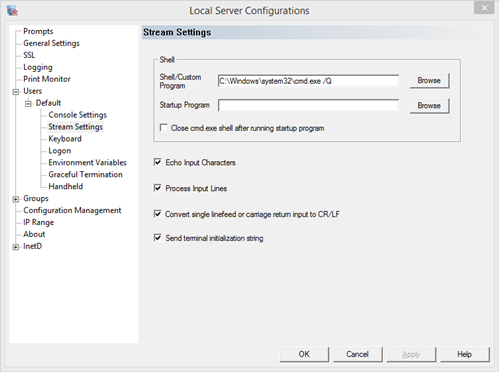
User Shell - the program run when a user connects
The user shell is the main program run when a user connects. Enter the program with full path, without spaces or in 8.3 notation. This can be either the standard cmd.exe user shell, or any program that supports standard input/output streams. If the program does not require any initialization, such as setting environment variables or running multiple programs, set the program as the user shell to make sessions more efficient.
Startup Program - assign what will happen when a client first connects
The startup program is a batch file, command, or login script to run before the user gets control. The program or batch file should include full path in quotes or in 8.3 notation, unless the program exists in the configured home directory on the General Settings page. A login script can be specified in either in the Windows User Management, or under Stream Settings. To avoid conflicts, Windows logon script setting should be turned off if the user is to run a telnet logon script.
Close cmd.exe shell after running startup program - close the user shell after running the startup program
With this option checked the server will run the user shell and startup program then exit the session. This will prevent any user from gaining access to the user shell.
Echo Input Characters
With this option characters typed by the client will be echoed by the server. If the client will also echo characters as they are displayed, then this option should be turned off so that the user does not experience a double echo.
Process Input Lines
This option sets whether the input from the client will be processed by character or by line. Turn this off to send data as it is available in Stream Mode. Otherwise the data will be parsed by line feeds.
Convert single linefeed or carriage return input to CR/LF
Most Windows applications expect a CR/LF combination to process an enter key. This option will automatically convert any CR or LF received from the client to the CR/LF pair. If the client already sends a CR/LF, nothing is changed. If a application does not require the CR/LF pair, then turn off this option to send only the CR or LF to the application.
Send terminal initialization string
A terminal initialization string is sent to the client to set screen color, cursor location, and graphic character set. If the client is designed to accept a straight stream of data, this string might be ignored by the client and output to the screen. Turn this option off to stop the server from sending an initialization string. This option can be used in one of the console modes as well, but normally the string does not interfere with a console session.
|