|
Use Pragma Session Manager to monitor telnet, ssh, scp, sftp, and terminal connections to a server, local or remote. The manager displays current users and provides a method to remove a single user or all current users. Pragma Session Manager uses the InetD service to communicate user information with the server. All information communicated between the Session Manager and the server is encrypted.
The telmsrvc ( or telmsrvc64 ) service is configured by the installation as an InetD Service. The default values for the configuration are:
Service Name: Session Manager
Service Properties:
Service: telm
Application: Installation Path\telmsrvc.exe or ( Installation Path\telmsrvc64.exe )
Arguments:
Network Properties:
TCP/IP Port: 954
Type: stream
Protocol: tcp
After starting Pragma Session Manager, select the menu item Manage->New Machine, or if a previous connection has been made to the server, select the server from the recently used list. If connecting to a machine for the first time, the New Connection dialog will open. Use this dialog to enter machine name.
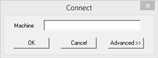
By default, NTLM authentication will be used to connect to the server. If another user id or different port should be used, then use the Advanced button.
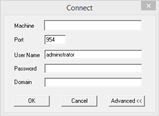
Only an administrator account will be authorized to connect through Pragma Session Manager.
Port 954 is default, but if this port is unavailable on the server, it can be changed in the port edit box. Make sure the port used in this dialog is the same as the port assigned to the Session Manager service on the server.
Once a connection to the server has been made, a window will open displaying all current users. Multiple servers can be monitored simultaneously, each appearing in a separate window. Sort the entries by clicking on the heading of the desired column.
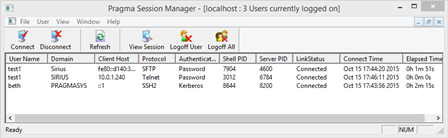
Logoff Users
To disconnect connected users from the server side use the User menu. Use the item Logoff All Users to log off all telnet, ssh, scp, sftp, or terminal connected users. To logoff a single user, select that user from the displayed list, and select the item Logoff User. Use the menu item Refresh User List to force a redraw of the user list, if it is not updated immediately.
View Sessions (telnet only)
Pragma Session Manager can be used to view telnet sessions. Select the user to view, then choose the Menu option User -> View Session. A console window matching the user's session will open. Close the window when done viewing. Each session window will remain open, even after Pragma Session Manager closes. Stream sessions will show a window stating that new information will display as the user types. This is a restriction of the stream mode session, since no screen is maintained.
|