|
The Prompts page is used to change what the user sees when first connecting to the server.
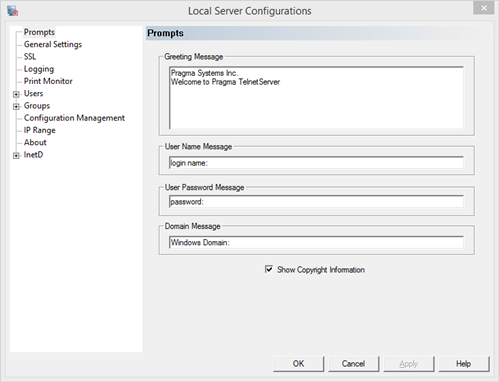
Greeting Message
The greeting message is displayed when a user first connects to the server. This message could contain instructions and warnings to the user. This cannot be changed in the evaluation version.
User Name Message
The user name message is displayed when prompting the user for their name.
User Password Message
The password message is displayed when prompting the user for their password.
Domain Message
The domain message is displayed when prompting the user for their domain. If users should not be prompted for domain, this value can be empty. To assign a default domain, set this value to empty and assign the default domain under the Auto Logon dialog under the InetD -> TelnetServer page.
Show Copyright Information
Display the Pragma Systems copyright message at connection. The copyright message cannot be turned off in the evaluation version.
|