|
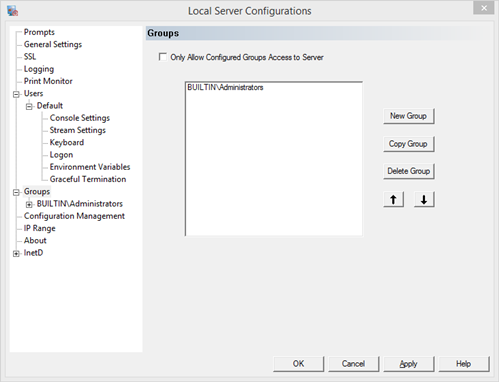
Pragma TelnetServer Manager Groups page is used to give different configurations to users by group, and to restrict access to only the groups listed. This page is not designed to create users for access to the server. All users with valid Windows accounts, with Log on Locally rights are allowed access to the server by default. This page is to configure what will happen when the user connects to the server.
Configured Groups, when used in conjunction with the "Only Allow Users of Configured Groups Access to the Server" check box, allows administrators to limit which users can access the server by Windows groups. For example, if only members of the Administrators group should be allowed access to the server, then instead of manually entering each user, the Administrators group can be added here in one step. Both local and global groups may be specified.
Configuration settings can also be set by group membership. Use the up and down arrows to order the groups. The first group that a user is a member of will be used to load settings.
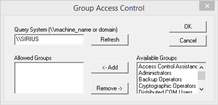
To create a new group configuration, specify the server where the group resides, adding the "\\" before the machine name, or a domain controller without "\\" and click the refresh button. Select the group or groups from the group list and click Add. Multiple groups can be selected using the control key.
New Group - create a new group. The new group will take the settings of the Default user configuration on the User Management page.
Copy Group - copy the select group configuration
Delete Group - delete the selected group configuration
Up and Down Arrows - Order the group list.
If a user is a member of multiple configured groups, the first group in the list will be used for configuration settings. Move groups up and down to order the groups as needed.
Only Allow Users of Configured Groups Access to Server
This option restricts access to the server to only users who have been listed on this dialog.
NOTE: If both the restrictive check boxes for Users and Groups are checked, then a user must be both a configured user and a member of a configured group; not just one or the other.
|