|
Each service monitored by InetD is defined with the Configure Service dialog.
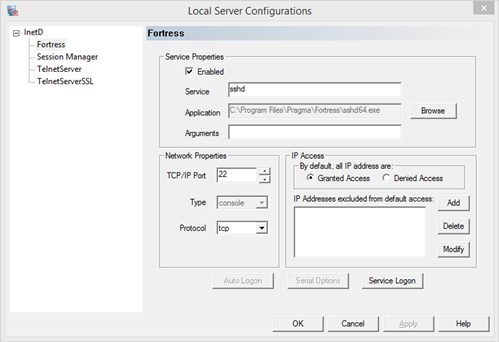
Service Properties:
Enabled Turn on to have InetD monitor this service
Service Name of the application
Application The application to be launched, including full path
Arguments Any command-line arguments
Network Properties:
TCP/IP Port Specify the TCP/IP port that the application uses. This number must be unique to this service. If another InetD service is monitoring this port, the user will be notified to change the port number.
Protocol Specify either TCP or UPD
Type console - programs designed to run in a console
stream - programs which require direct input/output
gui - programs which open a separate window or dialog
Service Logon:
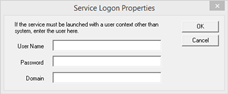
All applications configured to use InetD inherit, by default, the InetD service's permissions and security. To run an application with different security and permissions than that of InetD, specify a User Name, Password, and Domain of the account under which to run the configured application. The user account must have the "Logon as Service" access right for this to work.
Serial Options:
This button is no longer used with the InetD service.
Default Values
The default settings for the services that might be created during an installation are:
Service Name: Session Manager - This service is used for user management clients, such as the Session Manager and telmc clients.
Service Properties:
Service: telm
Application: Installation Path\telmsrvc.exe (or telmsrvc64.exe)
Arguments:
Network Properties:
TCP/IP Port: 954
Type: stream
Protocol: tcp
Service Name: TelnetServer - This is the telnet server for connection by telnet clients.
Service Properties:
Service: telnet
Application: Installation Path\TelnetD\telnetd.exe (or telnetd64.exe)
Arguments:
Network Properties:
TCP/IP Port: 23
Type: console
Protocol: tcp
Service Name: Fortress - This is the ssh server for connection by ssh, sftp, and scp clients.
Service Properties:
Service: sshd
Application: Installation Path\Fortress\sshd.exe (or sshd64.exe)
Arguments:
Network Properties:
TCP/IP Port: 22
Type: console
Protocol: tcp
Service Name: Remote Exec - This is the rexec server for connection by rexec clients.
Service Properties:
Service: rexecd
Application: Installation Path\InetD\rexecd.exe (or rexecd64.exe)
Arguments:
Network Properties:
TCP/IP Port: 512
Type: console
Protocol: tcp
Service Name: Remote Shell - This is the rsh server for connection by rsh clients.
Service Properties:
Service: rshd
Application: Installation Path\InetD\rshd.exe (or rshd64.exe)
Arguments:
Network Properties:
TCP/IP Port: 514
Type: console
Protocol: tcp
See Also:
The InetD Service
|