|
The Configuration Management page is used to organize who has the ability to make changes or read the configuration settings, as well as multiple import/export methods.
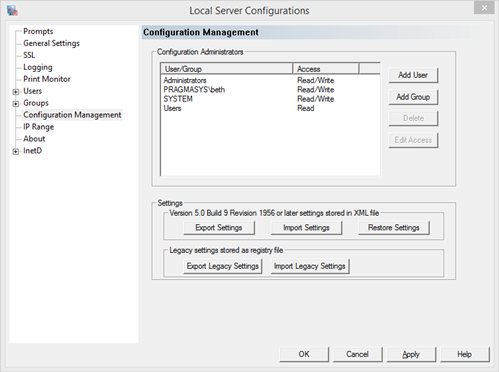
Configuration Administrators - add/remove Pragma TelnetServer configuration administrators
The configuration administrators are those that can either edit or view the configuration settings.
Add User - add a single user to the list of administrators
Add Group - add a group to the list of administrators
Delete - delete the selected user/group from the list of administrators
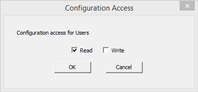
Edit Access - modify the type of access for the selected user.
Once a user/group has been added, the type of access can be changed to restrict them to read only access.
Settings Import/Export - import/export current configuration settings
Settings can be imported and exported for diagnostic reasons or for easy movement of settings from one machine to another.
XML import/export - Version 7.0 Build 9 Revision 1956 or later
The newer import/export feature writes an XML file that anyone can read or edit to make easy changes to the settings.
Export Settings - export current settings. A file dialog will open to choose a file name and location to save the current settings.
Import Settings - import settings from file. A file dialog will open to choose the file for import.
Restore Settings - restore settings from predefined file, telnet_default_settings.xml, shipped with the server, located in the Shared Files subdirectory of the installation folder. If this file is modified directly, or overwritten by the Export Settings feature, the default installation values will be lost.
The Local Server Configuration program has a command line option to quietly import settings from a file. This feature can be called after a silent install to update settings from the default installation values to user specific settings.
Usage
PragmaMgr /import [/ssh | /telnet] /file filename
Legacy Settings stored as registry file - Versions prior to Version 7.0 Build 9 Revision 1956
Prior versions had a export/import option that used the registry export. This type of export was a direct copy, so would have to be used as a backup or to transfer settings between duplicate computers. For example, any reference to domain, installation path, domain, platform, etc. would need to match exactly.
Export Legacy Settings - Export settings using the registry format
Import Legacy Settings - Import settings using the registry format
|