|
Auto logon allows the configuration of a logon id for all connections made to the monitored port. This feature is restricted to ports with the telnet name. It is ideal for hand held clients to connect immediately to the server, then use a separate logon id to logon to the application. It appears to the user that they are logging in only once.
To setup auto logon, in the Local server Configuration program, click on InetD, then the service that has Auto Logon capability, named "telnet". The default service is TelnetServer. If the service is not configured for Auto Logon, the Auto Logon button will be disabled.
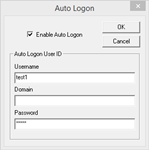
Turn on the Enable Auto Logon check box. Enter the username, domain, and password of the user that all session will use. Turn off the Enable Auto Logon check box to temporarily turn off the Auto Logon feature.
NOTE: This option does NOT PROVIDE ANY SECURITY. It is highly recommended that the server port be changed to anything other than 23.
Assigning a default domain
The Auto Logon dialog is used to assign a default domain. Enter only the domain value in the Auto Logon dialog and turn on the Enable Auto Logon check box.
|