|
The port forwarding feature of ssh and sshd allows any TCP or UDP application be made secure by passing their data over the secure ssh-sshd session without any changes to the application. This creates a secure network environment just by using ssh technology.
Using Pragma Fortress SSH Server installed on the same machine with a firewall that only allows ssh access, would guarantee that any supported protocol entering/leaving the network would be encrypted.
Use the Port Forwarding Control page to grant or deny access to specific ports and protocols. By default, any user can forward any protocol through any port. Port forwarding must be initiated by the client. This configuration is for restriction only.
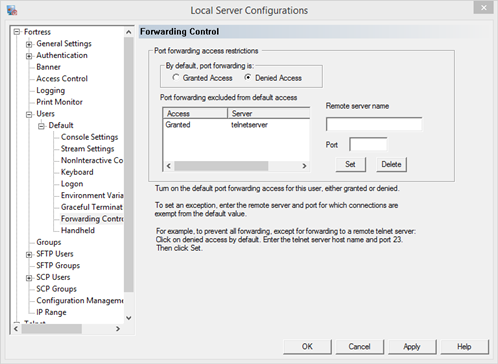
Port forwarding access restrictions
By default, port forwarding is:
Granted Access - all access granted except for exception list
Denied Access - all access denied except for exception list
Port forwarding excluded from default access: - list of exclusions
Remote server name - server name in exclusion list
The remote server name is the name of the server where traffic would be forwarded. This will be filled when editing or deleting a selected item. Click Delete to remove the item or Set to add/modify the item.
Port - protocol port on remote server
The port is listening port on the remote server. This will be filled when editing or deleting a selected item. Click Delete to remove the item or Set to add/modify the item.
See Port Forwarding for more information
|