|
The diagram below shows its use where ftp, smtp and pop3 traffic is passed through via ssh-sshd session.
To use port forwarding, the client must be configured to monitor multiple ports and which port to forward to on the server, then a Fortress SSH session should be initiated. Initiate the alternate protocol on the port being monitored by the client. The SSH client creates a local instance of the protocol daemon on the client port. The client becomes a configured protocol daemon. All secure connections to the remote daemon should actually be made to the local monitored port.
To use FTP over a ssh-sshd secure session, the ftp client must support passive mode for data transfer. Linux ftp and Pragma FTP Client, included with Pragma Fortress, support passive mode. Most Windows ftp clients available in the market commercially or as freeware, support passive mode. However, the ftp command line client that Microsoft bundles with Windows, does not support passive mode.
Example of Securing Email Traffic
Use the SSH -> Tunneling page to configure port forwarding to secure email traffic. Add a tunnel for incoming and outgoing email.
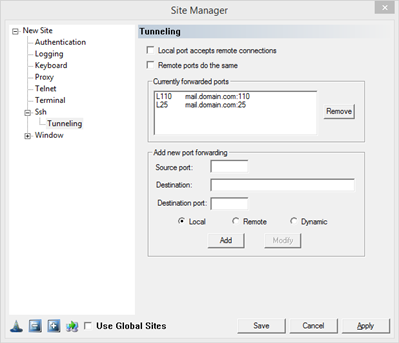
On the client machine, configure the mail server as localhost. To receive mail, the client will connect to localhost, port 110, which will be redirected through the Fortress session to port 110 on mail.domain.com, the actual mail server. The email data received will be full encrypted.
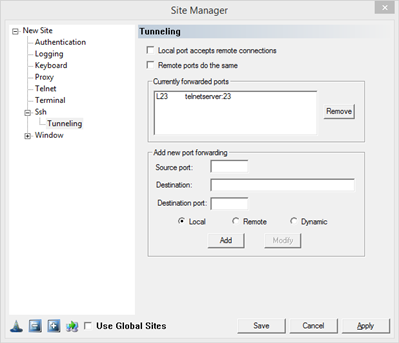
Example of Securing Telnet Traffic
Using Pragma Console SSH Client, configure the client to monitor the telnet ports and connect to the Pragma Fortress:
|