|
The Two Step Upload page is used to configure a sftp file upload that must be performed in two steps. Either to a temporary file name or temporary location. This can be necessary if a directory monitoring software is used to watch for file uploads. If issues arise and a directory monitoring program is in use on the server side, please try this feature.
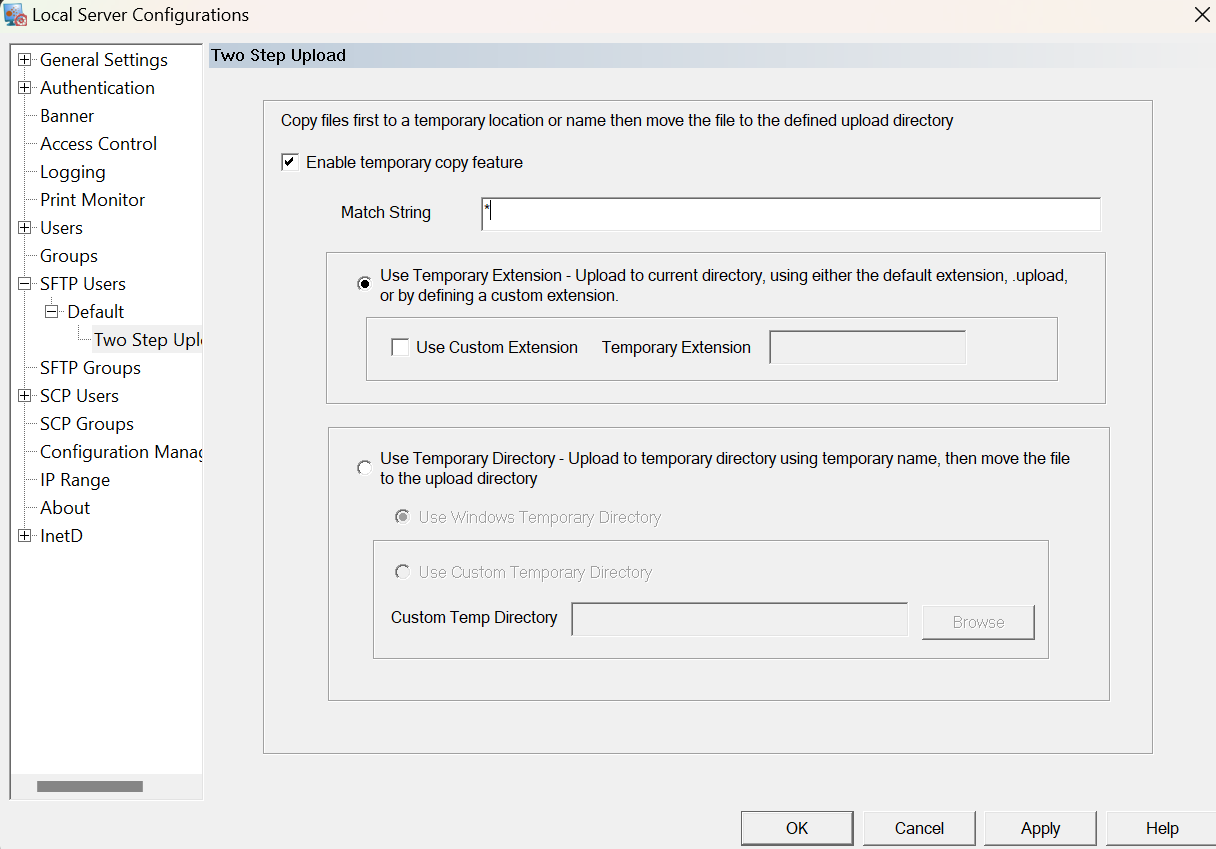
Enable temporary copy feature
This check box must be checked for the feature to be enabled on the server.
Match String
Define the type of files to be be uploaded in the two step method. Wild cards * and ? can be used to specify multiple filenames. For example, if all files uploaded should use the two step feature, then enter, *. If all csv files should be use a temporary copy, but all text files can be copied normally, then enter, *.csv.
Use Temporary Extension
Rename the file using a temporary extension. The file will be uploaded to the same directory, but a different extension will be used. Once the file is copied, the file will be renamed. The default copy will get a temporary filename from Windows.
Use Custom Extension
To note files specifically with a user defined extension.
Temporary Extension
Assign the extension used for the first step of the copy. The file name will stay the same, but the this extension will be used instead of the true file extension.
For example, to upload files with a .upload extension, enable the check box and assign .upload for the file extension.
Use Temporary Directory
Upload the file to a different directory from the configured upload directory. Once the file has been copied it will be moved to the actual home directory.
Use Windows Temporary Directory
Upload to the configured Windows temporary directory for the sftp user.
Use Custom Directory
If the Windows home directory is on a different drive than the final destination folder, the temporary directory should be changed to a location on the same drive. If files are not being uploaded correctly, check to see if the temporary directory is on a different drive and configured this option to use a location on the same drive as the final destination.
|