|
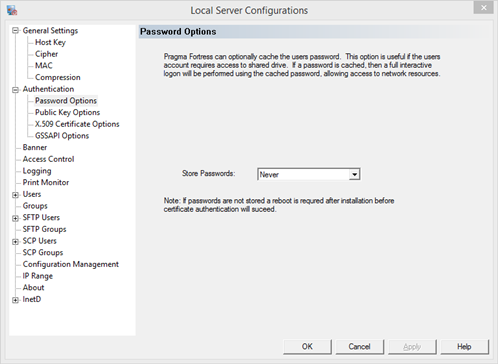
Use the Password Options page to configure if Pragma Fortress SSH Server will cache a users password. If a password is cached the user will have full user context, including network access, even if an alternative authentication method is in use.
Caching the password requires keyboard-interactive logon. If the client does not support keyboard-interactive the session will fail to connect. The user should either connect with a different client to cache the password or Store Passwords should be set to Never.
Note that the stored passwords are twice encrypted using AES-256. The first encryption is with a proprietary key, the second is with the Local System user key. This means that decryption can only be performed using our proprietary key from a process running as the LOCALSYSTEM account on the machine on which it was encrypted
The options for storing passwords are:
Never - never prompt a user to cache the password
Only when auto-loading keys - only cache passwords when one of the auto-store features in in use
Always - cache passwords for every connection made
If either Always or Only when auto-loading is chosen, the user will be prompted with a prompt "Authenticated with partial success." The user will be prompted once for password caching, unless the cached password is no longer valid.
Note: If the user is prompted more than once, the machine may need to be reboot to correctly load the cached password library.
|