|
Use the GSSAPI Options page to set how GSSAPI authentication will be performed.
GSSAPI (Generic Security Service Application Programming Interface) is an industry wide standard to access various security authentication mechanisms in an environment without knowing how it is implemented in an operating system. GSSAPI is the accepted standard in SSH world to use Kerberos or NTLM for user authentication. This allows users to login to a system securely without having to provide a password. All SSH related standard documents, including GSSAPI use in SSH, can be found at the web site http://www.ietf.org/html.charters/secsh-charter.html.
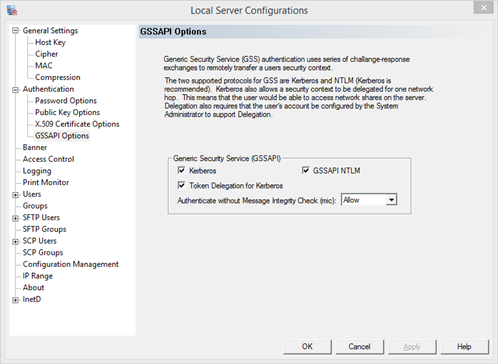
Kerberos - allow Kerberos authentication.
Kerberos is a highly secured authentication method that uses secret-key cryptography. During Kerberos authentication, the client proves its identity to the server and vice versa. A users identity is authenticated cryptographically by a Kerberos server without the user having to provide a password. A GSSAPI, Kerberos, supported SSH client must be used to connect with this authentication method.
Kerberos supports authentication across a wide variety of platforms like Microsoft Windows, Linux, HP-UX, Solaris and AIX using credentials obtained from the operating system. Starting with Windows 2000, all Microsoft Windows support Kerberos as the standard authentication method and Microsoft Active Directory is built with Kerberos and fully supports it.
Token Delegation for Kerberos - Allow the Kerberos authenticated user to have access to other network resources on the server.
This option needs to be on if a user needs to access any network resources, such as mapped drives or the ability to ssh or telnet to another server.
For this option to work, the system must be able to generate a delegate-level token. To do this, the following conditions must be met:
1.The user logging in cannot be marked as sensitive and cannot be delegated in Microsoft Active Directory directory service.
a.Log onto the domain controller using an administrator account.
b.Go to Active Directory Users and Computers
c.Right-click the user account that is to be delegated, and click Properties.
d.Under the Account tab, within the Account options, make sure that Account is sensitive and cannot be delegated is not selected.
2.The Pragma Fortress SSH Server server must be marked as trusted for delegation in Active Directory. If the service logon properties have been changed under the Configure InetD Service page, that user must be marked as trusted for delegation in Active Directory.
a.If the Pragma Fortress SSH Server service is running as a user other than LocalSystem.
1.Log onto the domain controller using an administrator account.
2.Go to Active Directory Users and Computers
3.Right-click the user account that is to be delegated, and click Properties.
4.Under the Account tab, within the Account options, click Account is trusted for delegation to select
b.If the Pragma Fortress SSH Server service is running as LocalSystem
1.Log onto the domain controller using an administrator account.
2.Go to Active Directory Users and Computers
3.Right-click the computer on which Pragma Fortress SSH Server is installed and click Properties.
4.Under the General tab, within the Account options, click Trust computer for delegation to select.
GSSAPI NTLM - Allow GSSAPI NTLM authentication.
NTLM is an authentication protocol used in various Microsoft network protocol implementations. NTLM is used throughout Microsoft's systems as an integrated single sign-on mechanism. In both GSSAPI (NTLM and Kerberos) methods, the interactive user information will be sent as the remote user context. You will not be prompted for user name or password. GSSAPI authentication cannot be used to log on a user other than the client interactive user. GSSAPI (NTLM) supported SSH client must be used to connect with this authentication method.
Note that Unix/Linux clients do not support NTLM, so NTLM option is only available to SSH clients which are on Windows platforms. NTLM is an older authentication protocol used in various Microsoft network protocol implementations like Windows NT 4.0, 95, 98 and Me.
Authenticate without Message Integrity Check (MIC)- Set a preferred MIC (Message Integrity Check) setting.
Allow - authenticate connection from client with or without MIC support
Deny - do NOT authenticate from a client without MIC support
Force - authenticate ONLY without MIC, meaning clients will see this server as not supporting MIC
|