|
Use the Window page to configure options related to window operation during a session.
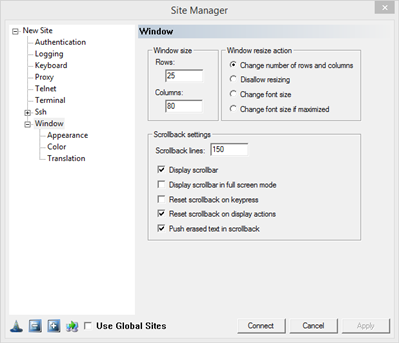
Window Size
Rows: Enter a value for the number of ROWS preferred in the window.
Columns: Enter a value for the number of COLUMNS preferred in the window.
Window Resize Action
Change Number of Rows & Columns: The number of rows and columns will change. The font will stay the same.
Disallow Resizing: prevent window resizing.
Change Font Size: Font size will change. Rows and column size will stay the same
Change Font Size if Maximized: Change font size when window is maximized.
Scrollback Settings
Scrollback Lines: The number of lines of history.
Display Scrollbar: Display scrollbars.
Display Scrollbar in Full Screen Mode: Dsplay scrollbar when viewing the window in full screen mode.
Reset Scrollbar on key press: Revert screen size when you press a key.
Reset Scrollbar on Display Actions: If this option is on, the screen will revert to showing the current terminal contents, if data is received by the server. If this option is off, the window will stay in the same location.
Push Erased Text in Scrollback: The contents of the terminal screen will be pushed into the scrollback when a server-side application clears the screen, to retain scrollback history.
|