|
The terminal page is used to configure specific emulation options.
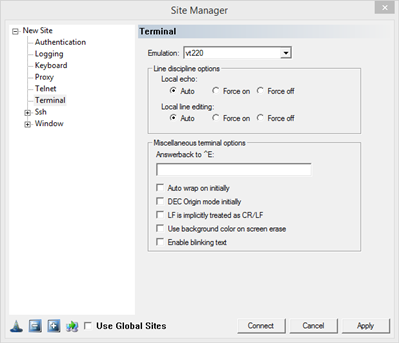
Emulation: Select the preferred emulation from the drop down menu.
Line Discipline Options:
Local Echo: With local echo disabled, characters you type into the FortressCL window are not echoed in the window by FortressCL. They are simply sent to the server. (The server might choose to echo them back to you; this can't be controlled from the FortressCL control panel.) Some types of session need local echo, and many do not.
Auto: set by the server
Force On: local echo is always on
Force Off: local echo is always off
Local Line Editing: how characters are sent to the server
Auto: set by the server
Force On: input not sent until the Enter key is pressed
Force Off: each character is sent to the server as it is typed
Miscellaneous Terminal Options
Answer back to ^E: This option controls what FortressCL will send back to the server if the server sends it the ^E enquiry character. Normally it just sends the string "FortressCL".
Auto wrap on initially: Auto wrap mode controls what happens when text printed in a FortressCL window reaches the right-hand edge of the window. With auto wrap mode on, if a long line of text reaches the right-hand edge, it will wrap over on to the next line. With auto wrap mode off, the cursor will stay at the right-hand edge of the screen, and all the characters in the line will be printed on top of each other.
DEC Origin Mode initially: DEC Origin Mode is a minor option which controls how FortressCL interprets cursor-position control sequences sent by the server. The server can send a control sequence that restricts the scrolling region of the display. For example, in an editor, the server might reserve a line at the top of the screen and a line at the bottom, and might send a control sequence that causes scrolling operations to affect only the remaining lines. With DEC Origin Mode on, cursor coordinates are counted from the top of the scrolling region. With it turned off, cursor coordinates are counted from the top of the whole screen regardless of the scrolling region.
LF is implicitly treated as CR/LF: Most servers send two control characters, CR and LF, to start a new line of the screen. The CR character makes the cursor return to the left-hand side of the screen. The LF character makes the cursor move one line down (and might make the screen scroll). Some servers only send LF, and expect the terminal to move the cursor over to the left automatically.
Use background color on screen erase: If this option is on a clear screen sequence from the server, will use the configured background color. If this option is off, the screen will clear to the last color sequence received by the server.
Enable blinking text: If this option is checked, blinking text set by the server is allowed. If this option is off, blinking text will be ignored.
|