|
Use the ssh page to configure options specific to a ssh connection.
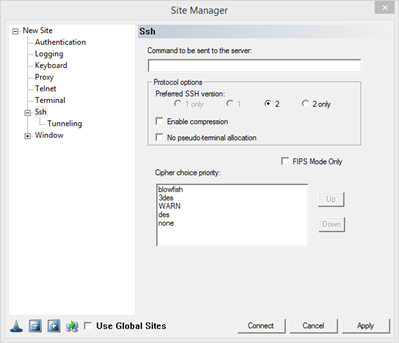
Command to be sent to the server: To send a command to be processed on the server without launching an interactive session. The command entered here will be passed to the server alone, and a shell session will not be started.
Protocol Options: Select your preferred SSH version. Choosing option 1 or 2, will allow FortressCL to negotiate to the alternate protocol if the requested protocol is not available. Choosing option 1 only or 2 only, will prevent the use of the alternate protocol.
Enable Compression: This enables data compression in the SSH connection: data sent by the server is compressed before sending, and decompressed at the client end. Likewise, data sent by FortressCL to the server is compressed first and the server decompresses it at the other end. This can help make the most of a low-bandwidth connection.
No pseudo-terminal allocation: When connecting to a Unix system, most interactive shell sessions are run in a pseudo-terminal, which allows the Unix system to pretend it's talking to a real physical terminal device but allows the SSH server to catch all the data coming from that fake device and send it back to the client.
FIPS Mode Only: Prevent any connection that does not use the approved cipher and MAC algorithms. See FIPS Mode.
Cipher choice priority: Drag the algorithms up and down in the list box (or moving them using the Up and Down buttons) to specify a preference order. FortressCL will search down the list from the top until it finds an algorithm supported by the server.
|