|
FortressCL can be configured to tunnel through a proxy server to connect to remote systems.
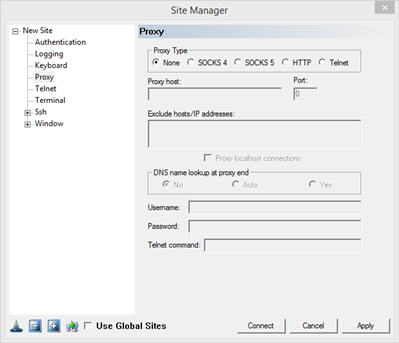
Proxy Type
None: no proxy is used
SOCKS4: SOCKS proxy
SOCKS5: SOCKS proxy with authentication
HTTP: proxy through a web server supporting the HTTP CONNECT command, as documented in RFC 2817
Telnet: Many firewalls implement a less formal type of proxy in which a user can make a Telnet connection directly to the firewall machine and enter a command such as connect myhost.com 22 to connect through to an external host.
Proxy Host: Enter the IP Address of the Proxy host.
Exclude Host / IP Addresses: Enter ranges of IP addresses, or ranges of DNS names, for which FortressCL will avoid using the proxy and make a direct connection instead.
DNS Name Lookup at proxy end:
No: always use client DNS, and pass an IP address to the proxy
Auto: proxy server will signal how FortressCL should determine host ip address
Yes: pass host names straight to the proxy without trying to look them up first.
Username & Password: Enter a valid username and password for this proxy setting.
Telnet Command: For use with the Telnet proxy type, the usual command required by the firewall's Telnet server is connect, followed by a host name and a port number. Enter alternative commands in the edit box. In this string, use \n to represent a new-line, \r to represent a carriage return, \t to represent a tab character, and \x followed by two hex digits to represent any other character. \\ is used to encode the \ character itself. Also, the special strings %host and %port will be replaced by the host name and port number. The strings %user and %pass will be replaced by the proxy username and password specified in the edit boxes. To get a literal % sign, enter %%. If the Telnet proxy server prompts for a username and password before commands can be sent, use a command such as:
%user\n%pass\nconnect %host %port\n
which will send the username and password as the first two lines to the proxy, followed by a command to connect to the desired host and port.
Note: that if the %user or %pass tokens are not included in the Telnet command, then the "Username" and "Password" configuration fields will be ignored.
|