|
Click on the Authentication option of Local FortressSSH Configuration dialog (launched from Windows Start Menu > Pragma Server Management shortcut) to configure the Authentication settings.
When an option is turned on it will be allowed as a means of authentication, if the client requests it. The client will pass the server a requested list of authentication methods. The server will respond with the list of allowed methods. The negotiation will continue until all methods have been attempted or a successful logon has been achieved.
The ordering of authentication is GSSAPI (Kerberos/NTLM), Certificate, Password. If either GSSAPI or certificate authentication fails, password authentication will be used. If any of the options are disabled, then that method will be skipped. If password is disabled and one of the advanced options fails, the user will be disconnected.
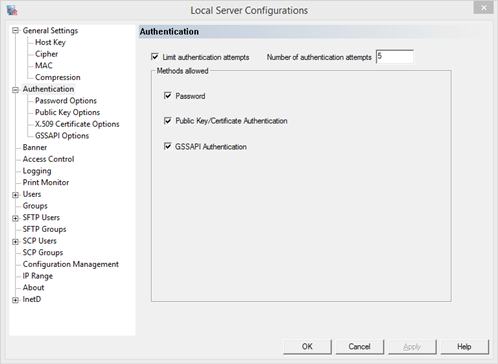
Limit Authentication Attempts
Enable the check box to configure the number of times a user my try to authenticate. Each method counts as a separate attempt. For example, if the client request key and password authentication, and the key attempt fails, the user will be allowed one less attempt to authenticate via password.
Number of authentication attempts
If authentications are limited, configure the number of times a user should be prompted for logon before failing. The user will need to make a new connection if not logged on successfully before this number is reached. This does not lock out the user, unless the operating system is configured to lock out users after a period of attempts. Each ssh attempt will count as an operating system attempt. If there is no operating system lock out the user can continue to logon without issue. This value can be overridden by the client.
Password - password authentication is allowed
Password authentication is when a user sends a password to the server. This can be done manually, scripted, or by the client.
Public Key/Certificate authentication - public key/certificate authentication is allowed
Public Key and certificate authentication are the same method, where a key pair is used for authentication. A password is normally not passed with the key. Pragma Fortress SSH Server has the ability to request a password to be cached with a certificate. This feature allows the user full user context access, including network access. Password authentication does not need to be turned on for the caching to be allowed.
GSSAPI Authentication - GSSAPI authentication is allowed
Generic Security Service (GSS)authentication uses a series of challenge-response exchanges to remotely transfer a users security context. The current user context is passed with GSSAPI authentication. A different user id cannot be used with GSSAPI authentication.
The two supported protocols for GSS are Kerberos and NTLM. Kerberos is recommended of the two. Kerberos allows a security context to be delegated for one network hop, meaning the user can access a network share on the server. Delegation also requires the user's account be configured by the System Administrator to support "Delegation".
|