|
SSH Tunneling allows the client to open a secure connection between the client system and a remote system, allowing a second connection using any protocol to be secure.
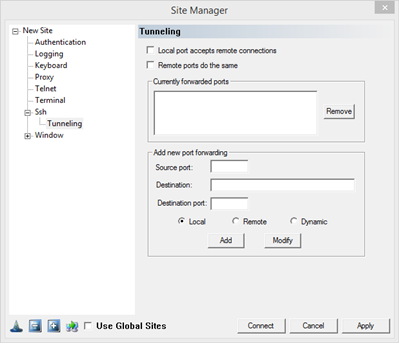
Local port accepts remote connections: Allow remote clients to connect to the local port. allowing remote systems to use the same tunnel.
Remote ports do the same: Allow remote clients to connect to the remote port, allowing remote systems to use the same tunnel.
Currently forwarded ports: A list of currently configured tunnels that will be activated at connection. To modify an existing tunnel, select the existing item and click Modify. Use the Add button to add a new tunnel.
Source Port - The port that will be opened for new connections.
Destination - The remote server to connect to if the Local Port is signaled.
Destination Port - The remote server port to connect to if the Local Port is signaled.
Type of connection:
Local: Open a port on the client system
Remote: Open a port on the remote server
Dynamic: FortressCL will assign a local SOCKS 4/4A/5 proxy on a local port.
|