|
Use the translation page for options related to using non-English fonts and keyboards.
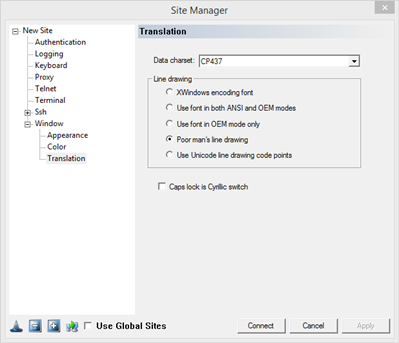
Data Charset: select your character set from the drop down menu "Data charset".
Line Drawing
VT100-series terminals allow the server to send control sequences that shift temporarily into a separate character set for drawing lines and boxes. FortressCL has a variety of ways to support this capability.
XWindows encoding font: is for use with fonts that have a special encoding, where the lowest 32 character positions (below the ASCII printable range) contain the line-drawing characters. This is unlikely to be the case with any standard Windows font; it will probably only apply to custom-built fonts or fonts that have been automatically converted from the X Window System.
Use font in both ANSI and OEM modes: tries to use the same font in two different character sets, to obtain a wider range of characters. This doesn't always work; some fonts claim to be a different size depending on the character set in use.
Use font in OEM mode only: is more reliable than using both ANSI and OEM, but can miss out other characters from the main character set.
Poor man's line drawing: assumes that the font cannot generate the line and box characters at all, so it will use the +, - and | characters to draw approximations to boxes. This is suggested if only the other options do not work correctly.
Use Unicode line drawing code points: tries to use the box characters that are present in Unicode. For good Unicode-supporting fonts this is the most reliable and functional option.
Cap Lock is Cyrillic switch: Switch between a US/UK keyboard layout and a Cyrillic keyboard layout by using the Caps Lock key. Currently this feature is not expected to work properly if your native keyboard layout is not US or UK.
|