|
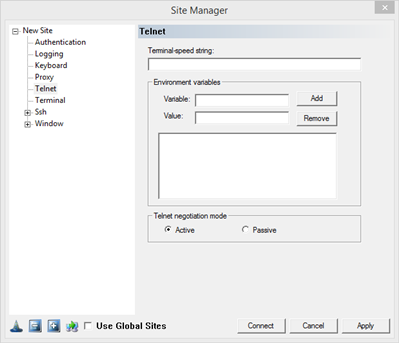
Terminal Speed String:
The Telnet, Rlogin, and SSH protocols allow the client to specify terminal speeds to the server. This parameter does not affect the actual speed of the connection, which is always "as fast as possible"; it is just a hint that is sometimes used by server software to modify its behavior. For instance, if a slow speed is indicated, the server may switch to a less bandwidth-hungry display mode.
The value is usually meaningless in a network environment, but it can be configured in FortressCL. The format is a pair of numbers separated by a comma, for instance, 38400,38400. The first number represents the output speed (from the server), and the second is the input speed (to the server). (Only the first is used in the Rlogin protocol.) This option has no effect on Raw connections.
Environment Variables:
The Telnet protocol provides a means for the client to pass environment variables to the server. Many Telnet servers have stopped supporting this feature due to security flaws, but FortressCL still supports it for the benefit of any servers which have found other ways around the security problems than just disabling the whole mechanism. To add an environment variable to the list transmitted down the connection, enter the variable name in the "Variable" box, enter its value in the "Value" box, and press the "Add" button. To remove one from the list, select it in the list box and press "Remove".
Telnet Negotiation Mode:
In a Telnet connection, there are two types of data passed between the client and the server: actual text, and negotiations about which Telnet extra features to use. FortressCL can use two different strategies for negotiation: In active mode, FortressCL starts to send negotiations as soon as the connection is opened. In passive mode, FortressCL will wait to negotiate until it sees a negotiation from the server. The obvious disadvantage of passive mode is that if the server is also operating in a passive mode, then negotiation will never begin at all. For this reason FortressCL defaults to active mode. However, sometimes passive mode is required in order to successfully get through certain types of firewall and Telnet proxy server.
|