|
Use the appearance page to define how the session window will look.
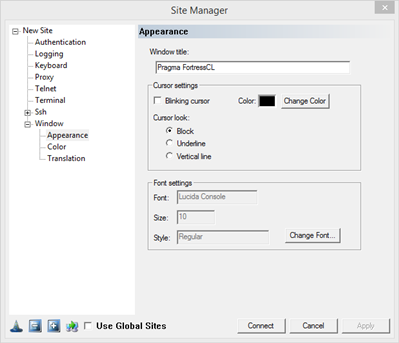
Window Title: This field is empty by default. Enter a string in this field which will be used to set the Window Title of your FortressCL Window.
Cursor Settings
Blinking Cursor: Check this box to so that the cursor will blink.
Color: Assign the cursor color.
Cursor Look
Block: A block that fills current cursor location
Underline: A single underscore at the cursor location
Vertical Line: A vertical line at the cursor location.
Font Settings
Font: Displays the current font.
Size: Displays the current font size.
Style: Displays the current font style.
Change Font: Click on this button change font settings.
|