Pragma Fortress SFTP/SCP Server
What is SFTP??
In computing, the SSH File Transfer Protocol or SFTP is a network protocol that provides file transfer and manipulation functionality over any reliable data stream. It is typically used with the SSH-2 protocol (TCP port 22) to provide secure file transfer, but is intended to be usable with other protocols as well. Compared to Secure Copy (SCP) protocol, which allows only file transfers, the SFTP protocol allows for a range of operations on remote files ? it is more like a remote file system protocol. An SFTP client?s extra capabilities compared to an SCP client include resuming interrupted transfers, directory listings, and remote file removal.
A common misconception is that SFTP is simply FTP run over SSH; in fact it is a new protocol designed from the ground up by the IETF SECSH working group. It is sometimes confused with Simple File Transfer Protocol.
Key Features
- Virtual Directories
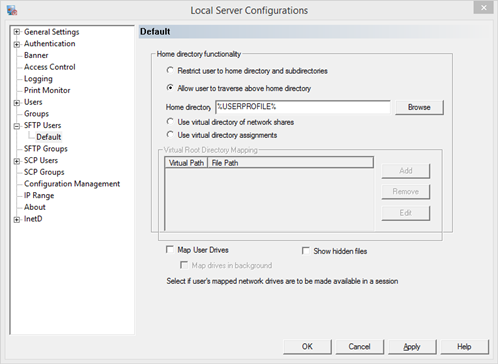
- Custom Home Directories
- Easy to setup
- Uses Windows file access
- Additional user/group restrictions
How about SCP?
Transfer files securely with a single command. Great for scripting.
SCP (Secure Copy) is a very popular method to securely transfer files or images. It works in conjunction with SSH and is usually packaged with an SSH product. Pragma bundles its SCP server and SCP client in Pragma SSH Server. An SCP client is also available in Pragma's client product Pragma SSH Client. Pragma Systems' SCP is FIPS 140-2 compliant, with FIPS 140-3 coming soon, and Microsoft Windows Certified. Pragma's SCP utilizes FIPS compliant AES encryption for highly secure authentication and file transfers.
Pragma SCP fully interoperates with Cisco SCP in Cisco routers and switches and can be used to transfer IOS images to backup or configure Cisco devices. Pragma SCP also fully interoperates with OpenSSH SCP, WinSCP and all industry compliant SCP servers and clients. Pragma SCP is robust and provides one of the fastest file transfer times in the industry. It has easy to use graphical manager interface to configure user access control and various SCP settings.
What's the difference?
SCP can only be used for transferring files and it is non-interactive (i.e., everything has to be specified on the command line). SCP is especially useful for batch files, scripting and automation. SFTP provides interactive commands for tasks like deleting or creating directories and files, directory listings and resuming interrupted transfers. SCP and SFTP encrypt both the file and any passwords exchanged so that anyone snooping on the network cannot view them. SCP was implemented as a secure alternative to Unix/Linux RCP (Remote Copy).
SCP is usually much faster than SFTP at transferring files, especially on high latency networks. This happens because SCP implements a more efficient transfer algorithm, one which does not require waiting for packet confirmations. This leads to faster speed but comes at the expense of not being able to interrupt a transfer, so unlike SFTP, SCP transfer cannot be canceled without terminating the session.
SCP is designed for simple copies, usually in scripts. Authentication can be done with a password, passed as a parameter, or with a certificate, so that no interaction is required by the user.
scp user@source:drive:/directory/file user@destination:drive/directory/file
The local username and machine and remote username are not required. For example, to copy the file foo.txt located in the temp directory on drive d: to the remote machine temp directory on drive c, use
scp d:/temp/foo.txt username@remote_machine:c:/temp/foo.txt
The reverse can be used, if you are copying from the remote machine.
scp username@remote_machine:c:/temp/foo.txt d:/temp/foo.txt
if username is not explicitly given for the local or remote user, the current logged on user name is used. Pragma SCP also supports Windows Active Directory, GSSAPI and all SSH authentications allowed greater ease of use in an enterprise. In fact, a simplest scp command can be given as:
scp foo.txt remotemachine:.
It means copy the current directory foo.txt file to the remote machine's home directory, using the current logged on user's name as the username.
Recursive copy with -r option is also very popular where a whole directory and files can be copied from a source to a target machine. Below -p options is also used to preserve the file and directory date and times.
scp -r -p dir1 remotemachine:.
scp -r -p remotemachine:c:/dir1 .
The SCP client accepts the following command line options, which are displayed if you enter SCP without options on the command line.
| p | preserve the original file date |
| r | recursively copy all files in the directory and all subdirectories |
| v | verbose mode - display debug information |
| C compression level | What compression level should be used. This is the same as the -C option for the ssh client |
| o options | Options that should be passed to the ssh client |
| P port number | server side port number |
| c cipher | |
| A password | password for authentication |
| a | Turn on statistics display for each file |
| q | Turn off statistics display. |
| Q | Turn on statistics display. |
The most common scp file transfer involves using a key for authentication. To pass a key for authentication use the -o option:
scp -oidentityFile2=key_name source_file user@server:destination_path/destination_file_name
SCP on a different port can also be done with the -o option:
scp -oport=portNumber source_file user@server:destination_path/destination_file_name